Public alpha · Self-hosted · AGPL-3.0
Commission KNX from a browser.
Busforge imports your ETS project, shows the bus live and programs real KNX devices, then reads each device back to check it holds what was written. Self-hosted in one Docker container, on Linux or a Mac.
For technically capable KNX users. Keep your ETS project as a backup.
Shown on real devices
Parameters programmed and read back on 18 products from ten manufacturers, all on twisted pair.
- ABB
- Basalte
- Gira
- GVS
- Jung
- MDT
- MEAN WELL
- OpenKNX
- Steinel
- Theben
Install and try it
1 · Run it
One container, one data volume, one master key that seals the Data Secure keys Busforge stores. Keep the key with your backups: without it a restored backup cannot open them.
Then open http://127.0.0.1:3000, create an empty project or import yours, and add your KNXnet/IP interface. The install guide covers compose, product definitions, USB interfaces, update, backup and restore, and the platforms Busforge has run on.
The published image is for x86_64. On arm64, a Mac with Apple silicon included, build the image first: the steps are under the command.
Busforge has no login. Keep it on a trusted network and never expose it to the internet.
# once; keep this file safe
[ -f busforge-master.key ] ||
  (umask 077; openssl rand -hex 32 > busforge-master.key)

docker run -d --name busforge \
  --stop-timeout 1800 \
  -p 127.0.0.1:3000:3000 \
  -v busforge-data:/app/apps/server/data \
  -e BUSFORGE_MASTER_KEY="$(cat busforge-master.key)" \
  ghcr.io/busforge/busforge:latest
On arm64 (a Mac with Apple silicon): build the image
Build it from a checkout, then run the command above with busforge in place of the image name.
git clone https://github.com/busforge/busforge.git
cd busforge && docker build -t busforge .
2 · Set up the demo
With Busforge running (step 1), no bus needed: the demo tool builds a small flat of four OpenKNX devices into your running instance: rooms, group addresses and every device configured and linked, nothing written to a bus. It downloads OpenKNX's release archives and checks each against a pinned hash.
It needs a checkout of the repository and Bun. The demo guide also covers the larger demo house built from the product databases you bring.
git clone https://github.com/busforge/busforge.git
cd busforge && bun install
bun run tools/demo-project.ts http://127.0.0.1:3000
Programmed, then read back
Bring an ETS project, or start empty and place devices from the product catalogue, and configure them in the browser. When you program, Busforge builds the device's memory image, checks the device, writes through your interface and reads it back, comparing byte for byte. A device that differs is reported, never shown as done.
- What a read-back proves
- That the device holds Busforge's bytes. A field the device does not give back and a restart it does not confirm are named in the result, not counted as read back. Whether they are the bytes ETS would write is a separate check, made against ETS captures product by product and shown in the compatibility list.
- Drift before you write
- Read a device Busforge supports and see, parameter by parameter, where it differs from your project.
- Small writes
- A flash writes the parts a change touches, parameters, group addresses or both, instead of a full download where the device allows it, and backs up what it overwrites first.
Programming, step by step
The application
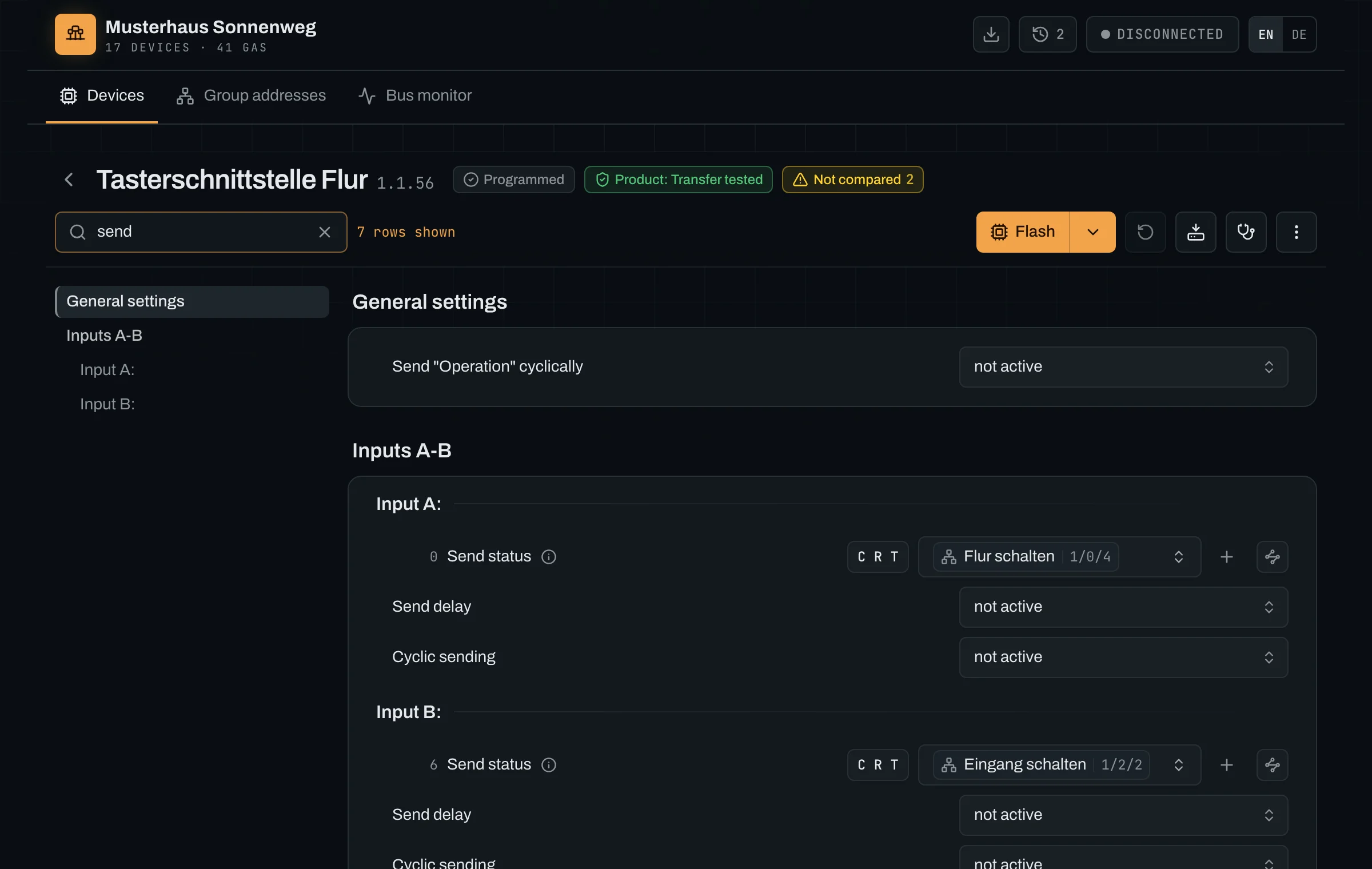
Screens from the larger demo, an invented house with seventeen devices of ten manufacturers built from their product databases. One of them, an MDT universal interface, is a real device on a test bench, programmed and read back there. Click or tap a screen to see it at full size.
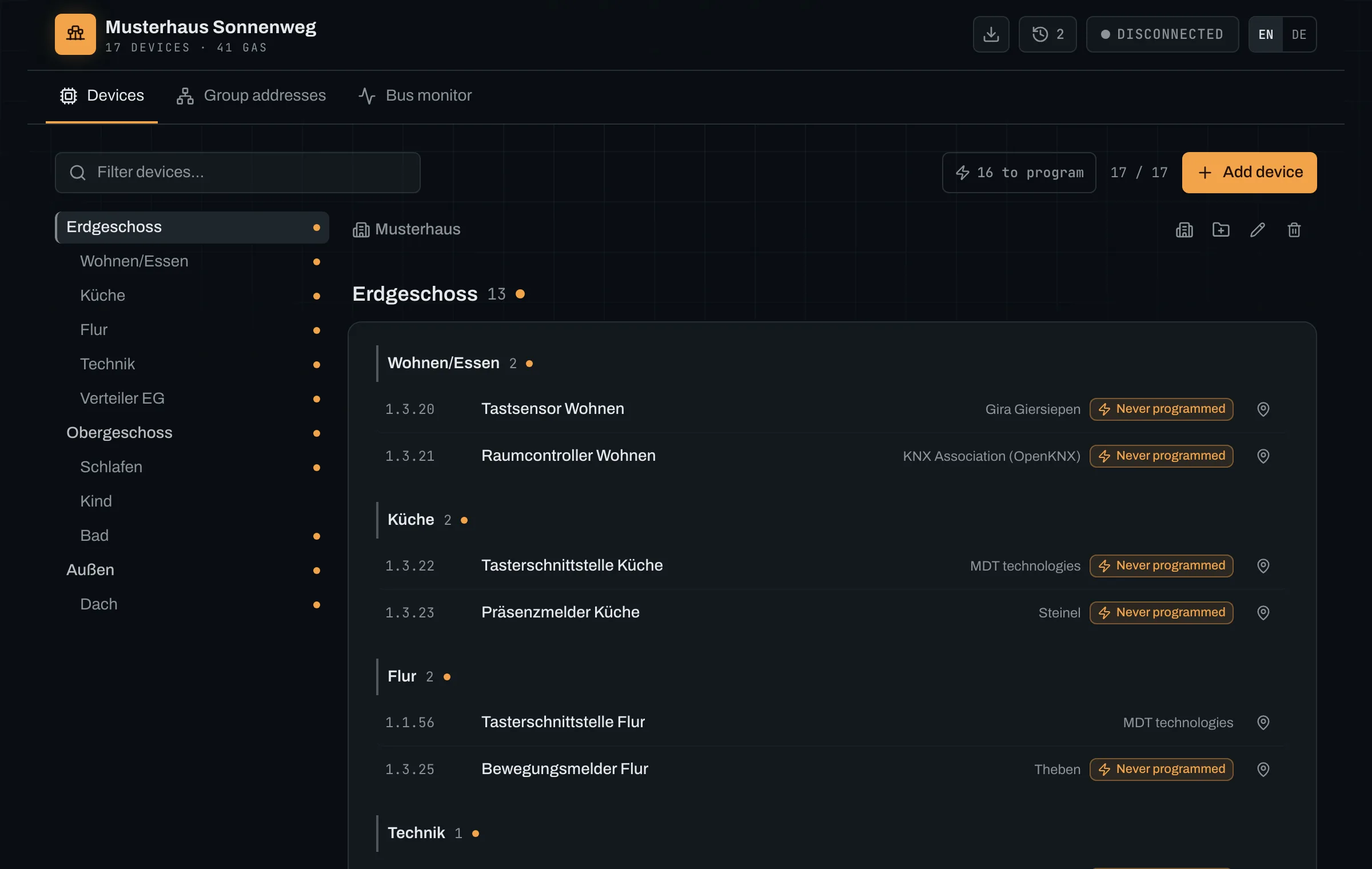
Your building, room by room
Every device with its individual address, its product and its programming state, under the floor and room it sits in. Start with an empty project or import the one from ETS.
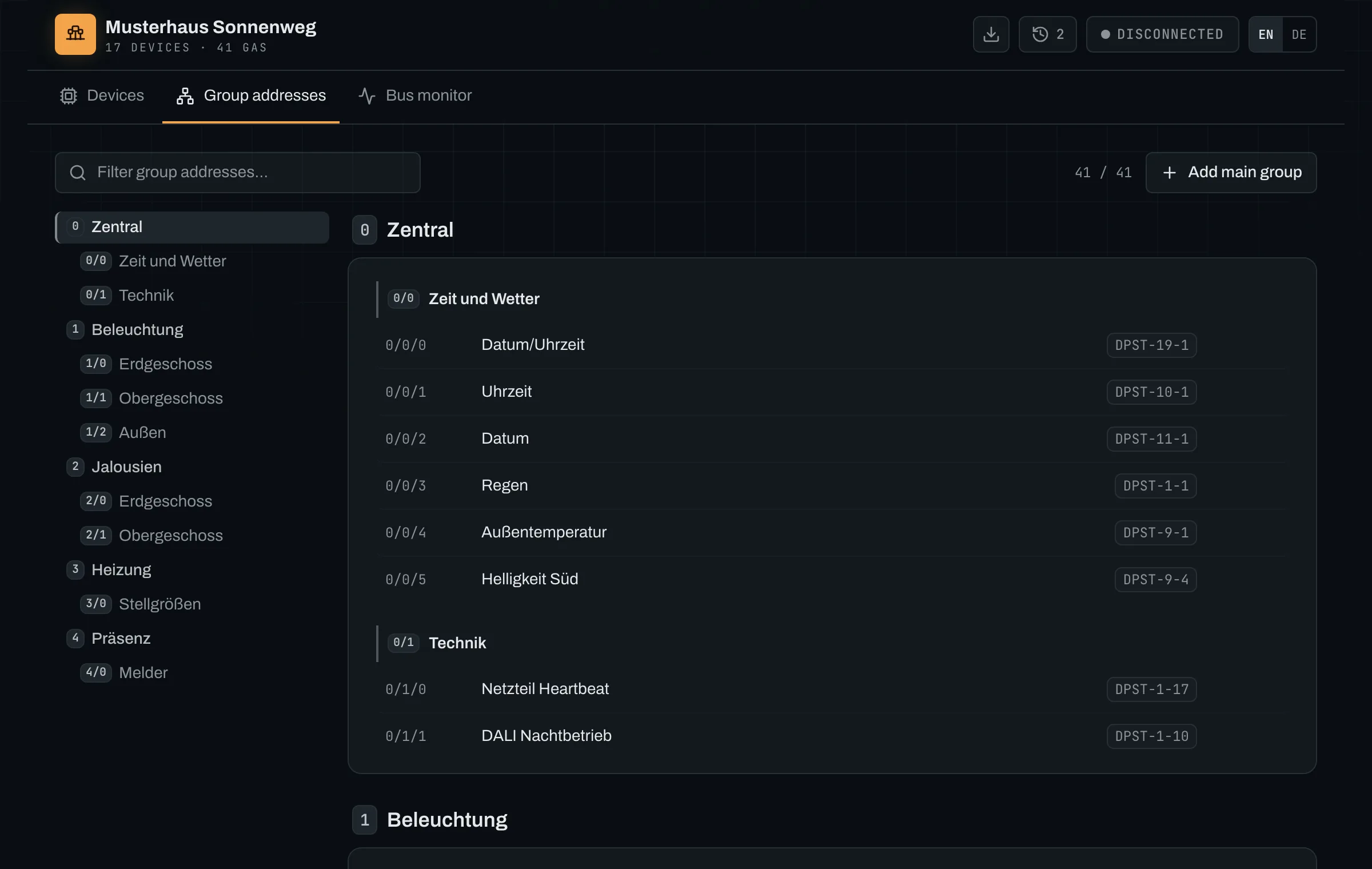
Group addresses, with their types
Main and middle groups, names and datapoint types, editable in place. Link an address from a device's parameter page, and the bus monitor shows its values decoded.
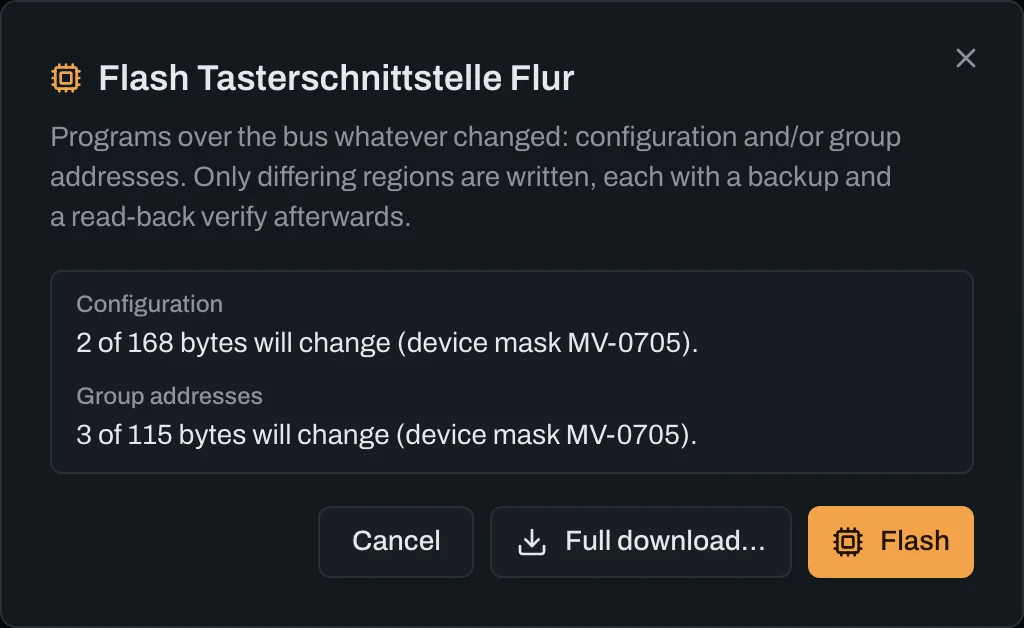
A preview before every write
The flash dialog first checks against the real device and says what it would write. Here one parameter and one group address were changed: 2 of 168 configuration bytes and 3 of 115 group-address bytes, each region backed up first and read back after.
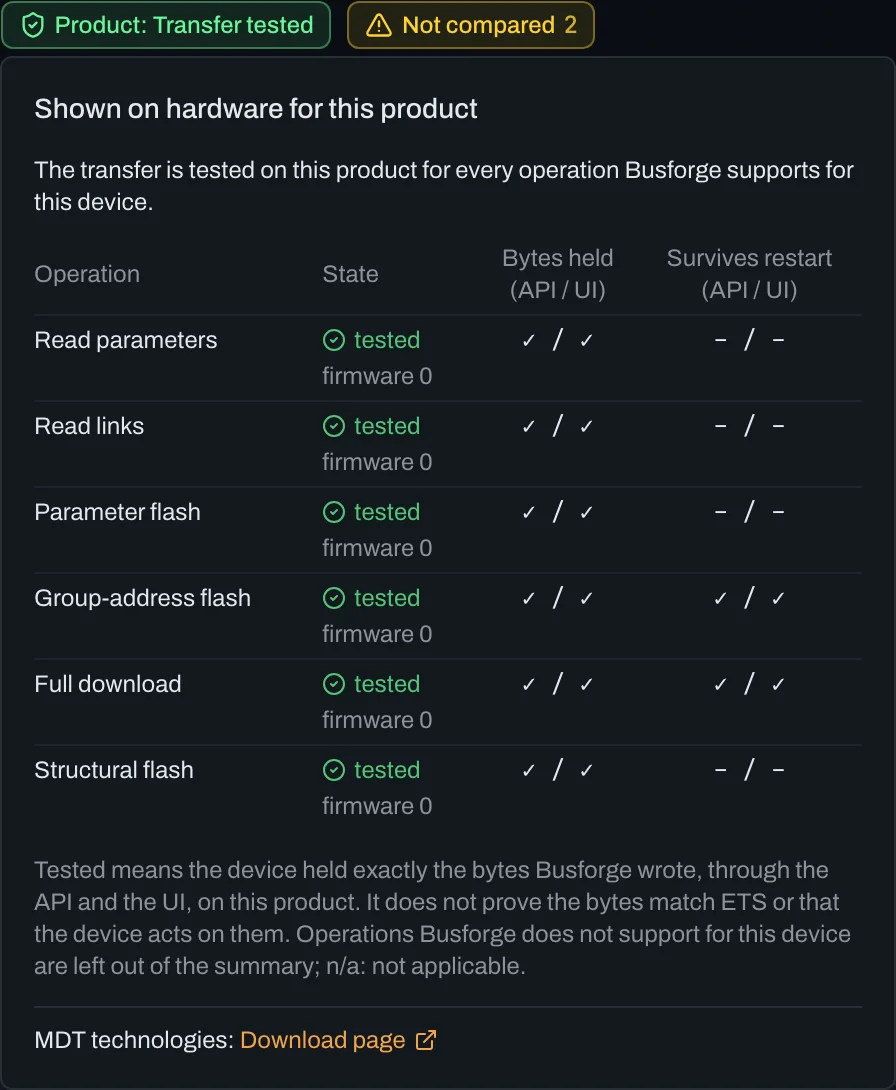
What has been shown for this product
Each operation with its state from the kept evidence, here a universal interface whose transfer is tested for every operation Busforge supports for it. A product nobody has tested says so, and is written only after you confirm it for the project.
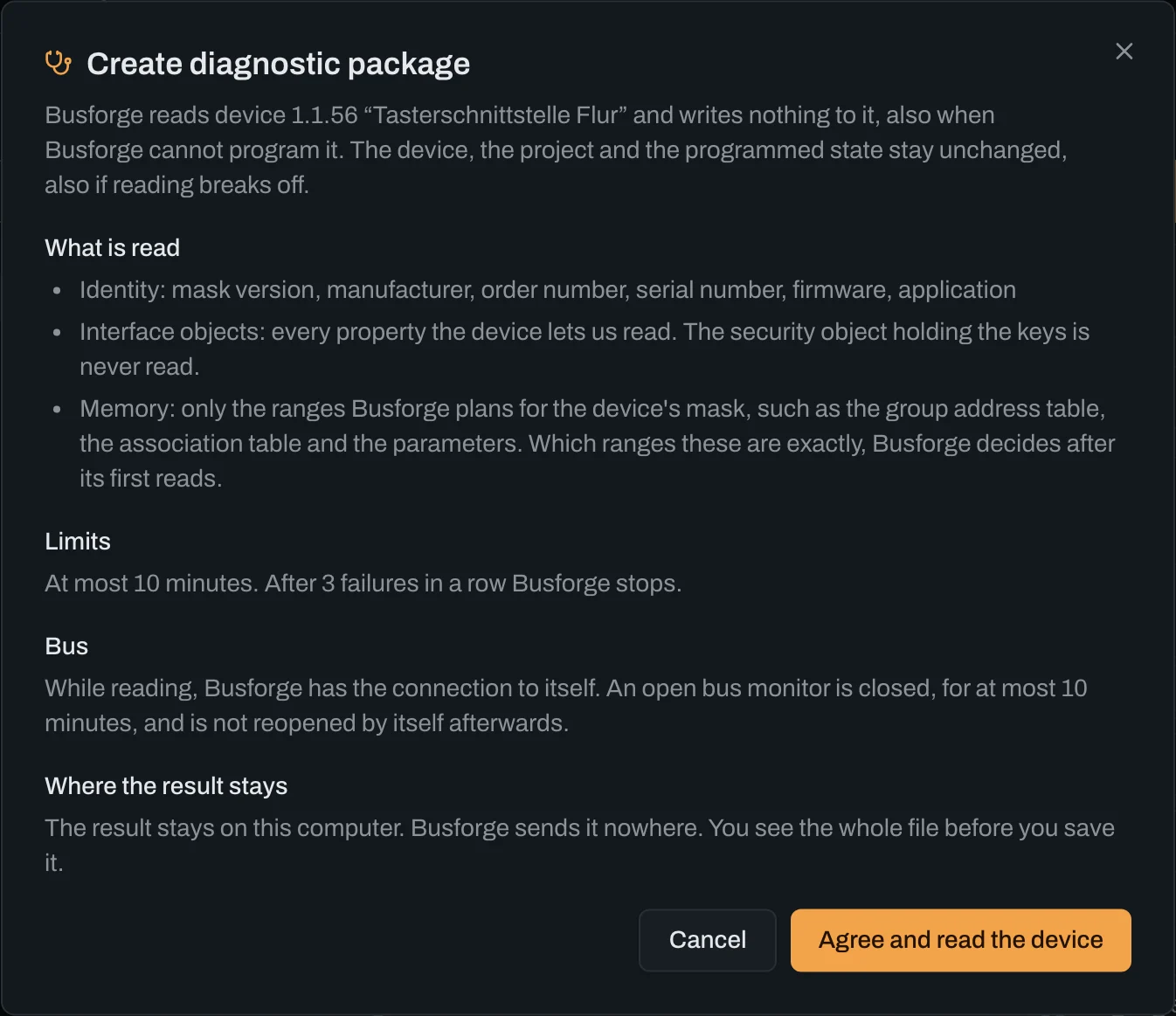
A diagnostic package for the rest
For a device Busforge cannot program yet, it reads identity, properties and planned memory, writes nothing, and lets you review the file before it leaves your computer.
What it does
An open alternative to ETS, without Windows. Programming writes bytes into a device in a real building, so Busforge refuses what it cannot do with a coded error rather than guessing.
- Import
- ETS 5 and 6 projects, password-protected ones too, and manufacturer product databases.
- Watch
- A live bus monitor with decoded values and group-address names, Data Secure telegrams included.
- Configure
- The device's own parameter pages: conditions, channels, modules, translations.
- Program
- Parameters, group addresses and full downloads, over KNXnet/IP or USB.
- Commission
- Assign an individual address and bring up a factory-fresh device.
- Keep
- Restore points, drift detection and a project export, encrypted when you set a password.
KNX Secure
KNX Secure is two separate mechanisms. Busforge implements one of them.
supported
Data Secure
Read and program Data Secure devices, activate a factory device from its certificate, send and decode secured group telegrams. Shown on three products so far, plus the download of one secure IP interface.
not supported
IP Secure
Busforge connects to an interface over a plain KNXnet/IP tunnel. An interface that accepts only secure tunnelling cannot be used.
Limits of the alpha
Most KNX products have never been in front of Busforge. One without its own evidence is written only after you confirm, once per project, that it is untested. What Busforge does not support, or has never shown on a device:
- Firmware download
- not implementedNo separate application code load (LSM 5).
- System 2 and System 300
- refusedRecognised by their mask and refused.
- System 1
- read onlyWith one exception: the download of a Data Secure KNXnet/IP interface on mask MV-0012.
- Property-based loading
- not implementedInterface-object devices with no memory image are refused.
- Powerline, RF and IP media
- never on the wireAll hardware work so far was on twisted pair.
- KNX IP Secure
- not supportedPlain KNXnet/IP tunnelling only.
- Vendor plugins (DCA)
- one, read onlyA replacement view for one DALI gateway; nothing is written back.
- Login
- noneAnyone who reaches the port can program devices.
The known issues and what is shown on few devices are on the limitations page.
Report and contribute
Report a problem
Found a fault, or a device that works for you? Open an issue on GitHub, or let the app prefill one from a device's menu. The reporting guide shows what the link carries and what stays out of a public issue.
License
Free software under the GNU AGPL-3.0-or-later: free for any use, including commissioning installations for paying clients. Building Busforge into a closed product or service without the AGPL's obligations needs a commercial license; see fohlmeister.com. Contributions are welcome, see contributing.
Try it next to your ETS project
Start with the demo, then read one of your own devices back and compare it with your project before you write anything.